Fine-tune on your Mac in 5 minutes
Download the free Starter Pack, install EdukaAI Studio, click Train. No GPU, no cloud, no code. Want to curate your own data first? AI Curator handles that — but it's optional.
The complete local pipeline
Download the free Starter Pack from ai-curator.cloud, import into EdukaAI Studio, and train a model on your Mac. AI Curator is optional — use it to curate your own data before training.
Starter Pack
75 free samples, download from ai-curator.cloud
- No account needed
- No AI Curator needed
- Ready for Studio import
Train in Studio
Import, configure, click Train
- Drag & drop your dataset
- Pick a base model
- 5-10 min on M2 MacBook
Test & Compare
Dual Chat side-by-side
- Original vs fine-tuned
- Same prompt, both models
- Export LoRA or fused model
Walkthrough
From a fresh Mac to a fine-tuned model. Each step runs locally. No data leaves your machine.
Get the Starter Pack
Download the EdukaAI Starter Pack (75 free samples) from ai-curator.cloud/starter-pack. No account needed. The pack is a JSONL file ready to import into EdukaAI Studio. Or install AI Curator if you want to curate your own data first.
# Download from ai-curator.cloud/starter-pack # Or install AI Curator to curate your own data brew tap elgap/tap brew install ai-curator curatorInstall & launch EdukaAI Studio
One command installs Studio and all Python dependencies. Launch it, then open http://localhost:3030 in your browser. The app runs entirely locally on your Mac.
mkdir edukaai-studio && cd edukaai-studio curl -fsSL https://raw.githubusercontent.com/elgap/edukaai-studio/main/install.sh | bash ./launch.sh # Open http://localhost:3030Upload your dataset
Drag & drop your .jsonl file into Studio's upload area. The Starter Pack file works directly. You can also upload an optional validation dataset or let Studio auto-split your data into training and validation sets.
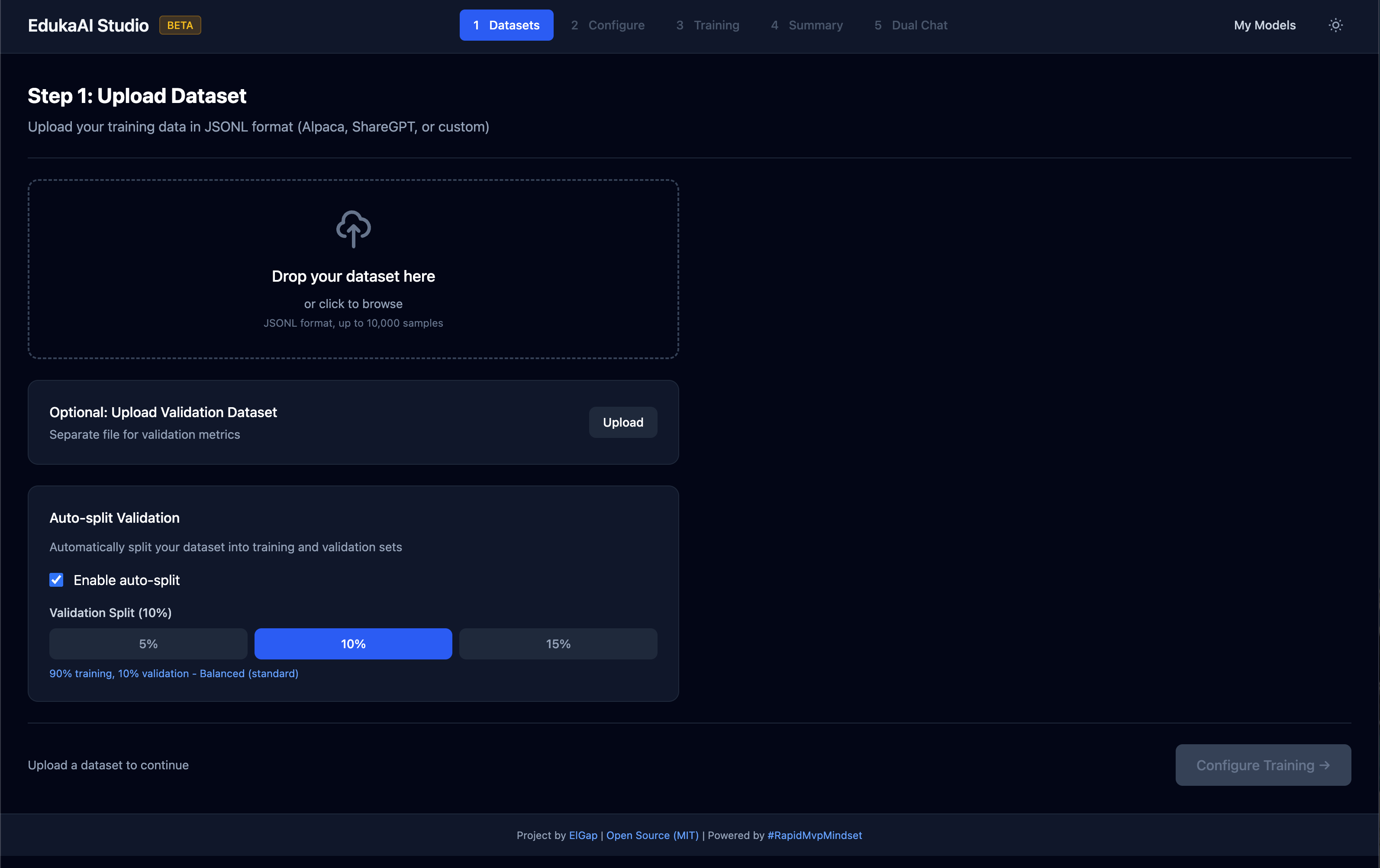
Tip: 100-1000 examples recommended for good results. Quality beats quantity — clean, diverse examples work better than lots of repetitive data.
Configure training
Select a base model, choose a training preset, and click Start Training. For your first run, start with a small model and the Quick preset. Defaults work well — no tuning required.
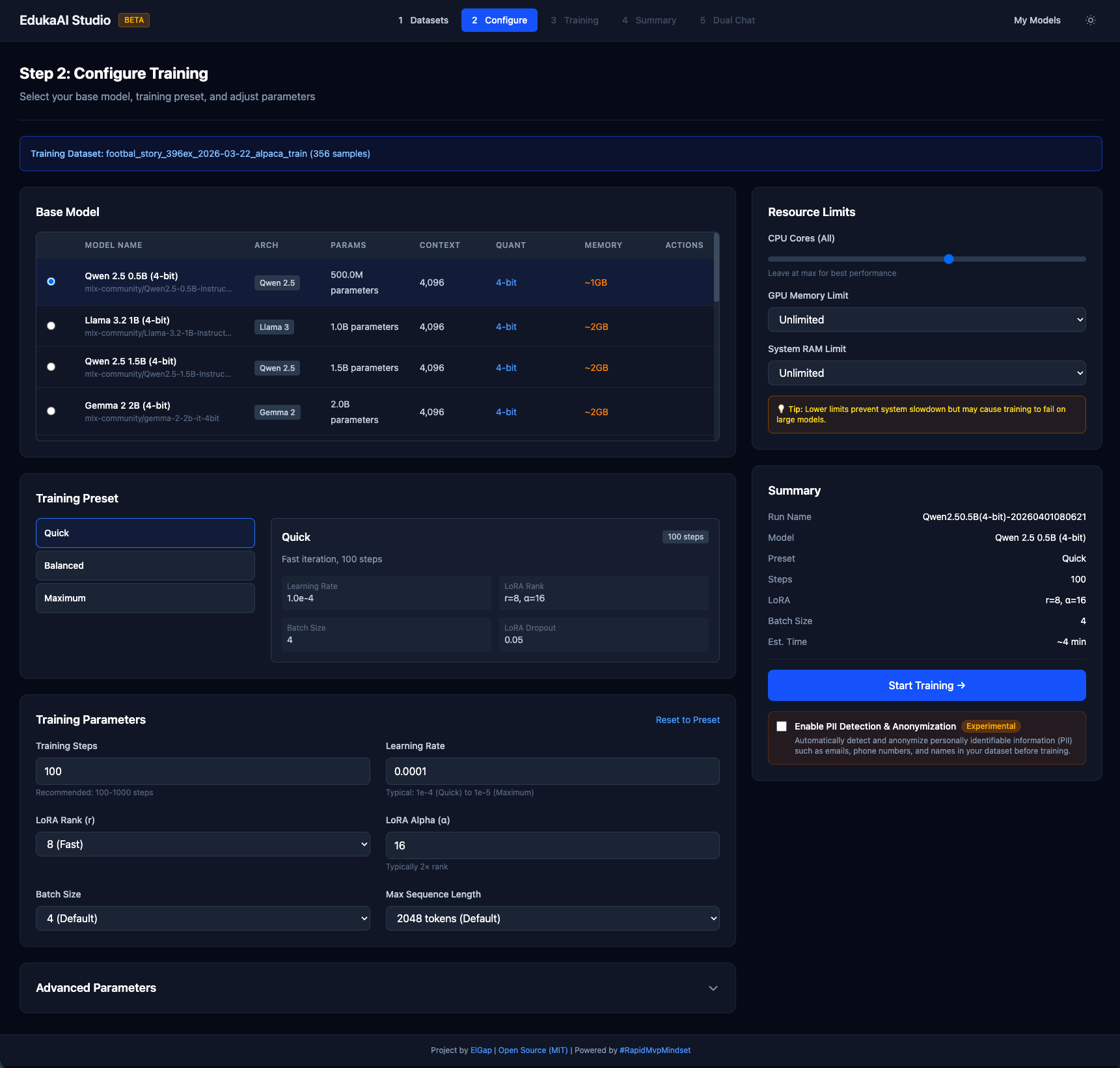
| Preset | Steps | Time | Best for |
|---|---|---|---|
| Quick | 100 | 5-15 min | Testing your setup |
| Balanced | 300 | 15-45 min | Most users |
| Thorough | 1000 | 1-3 hours | Best quality |
Monitor training
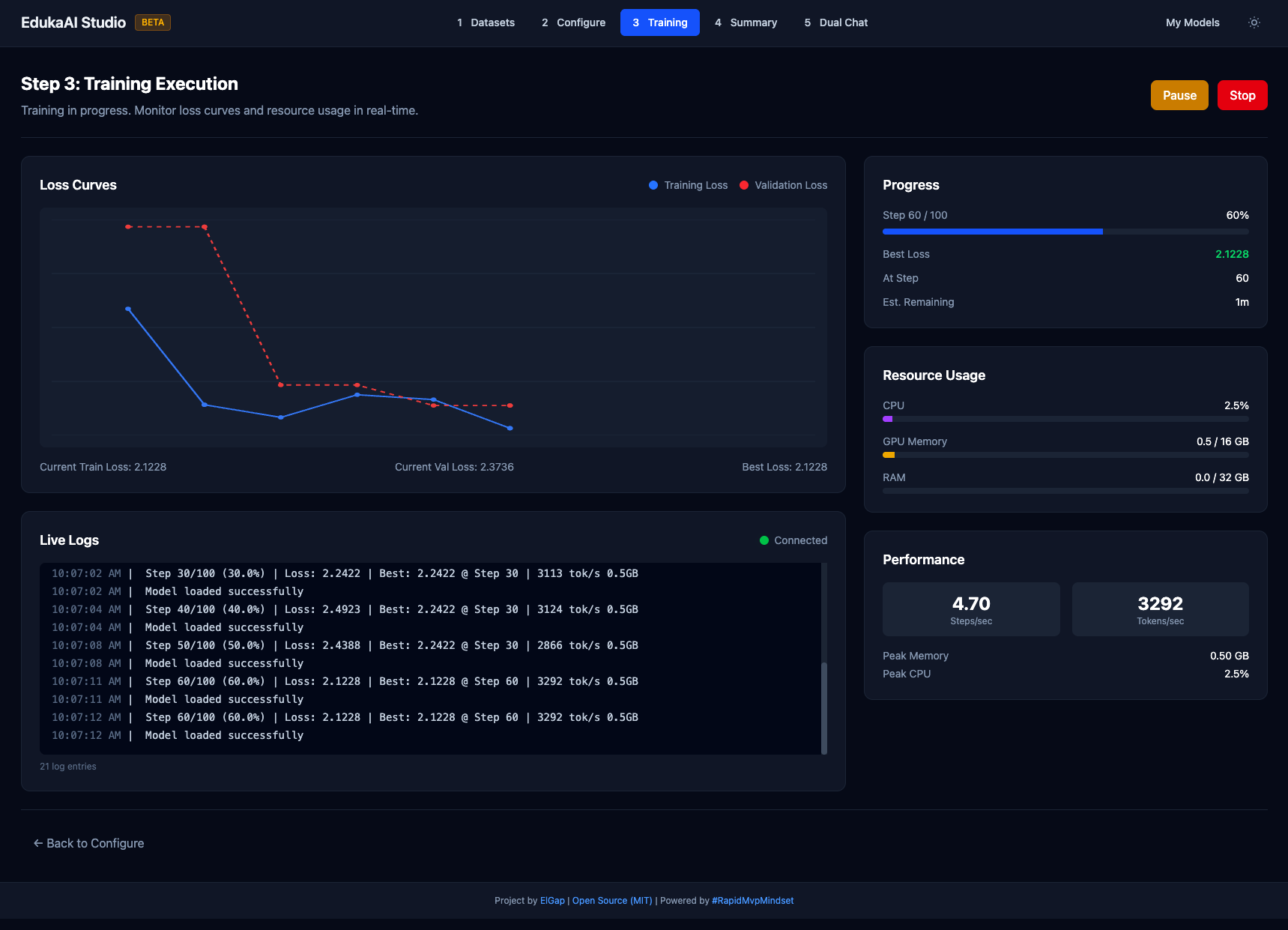
Watch the loss curve go down in real time. Training progress, speed, and estimated time are displayed live. Checkpoints save automatically. Training pauses if loss stops improving.
Review results
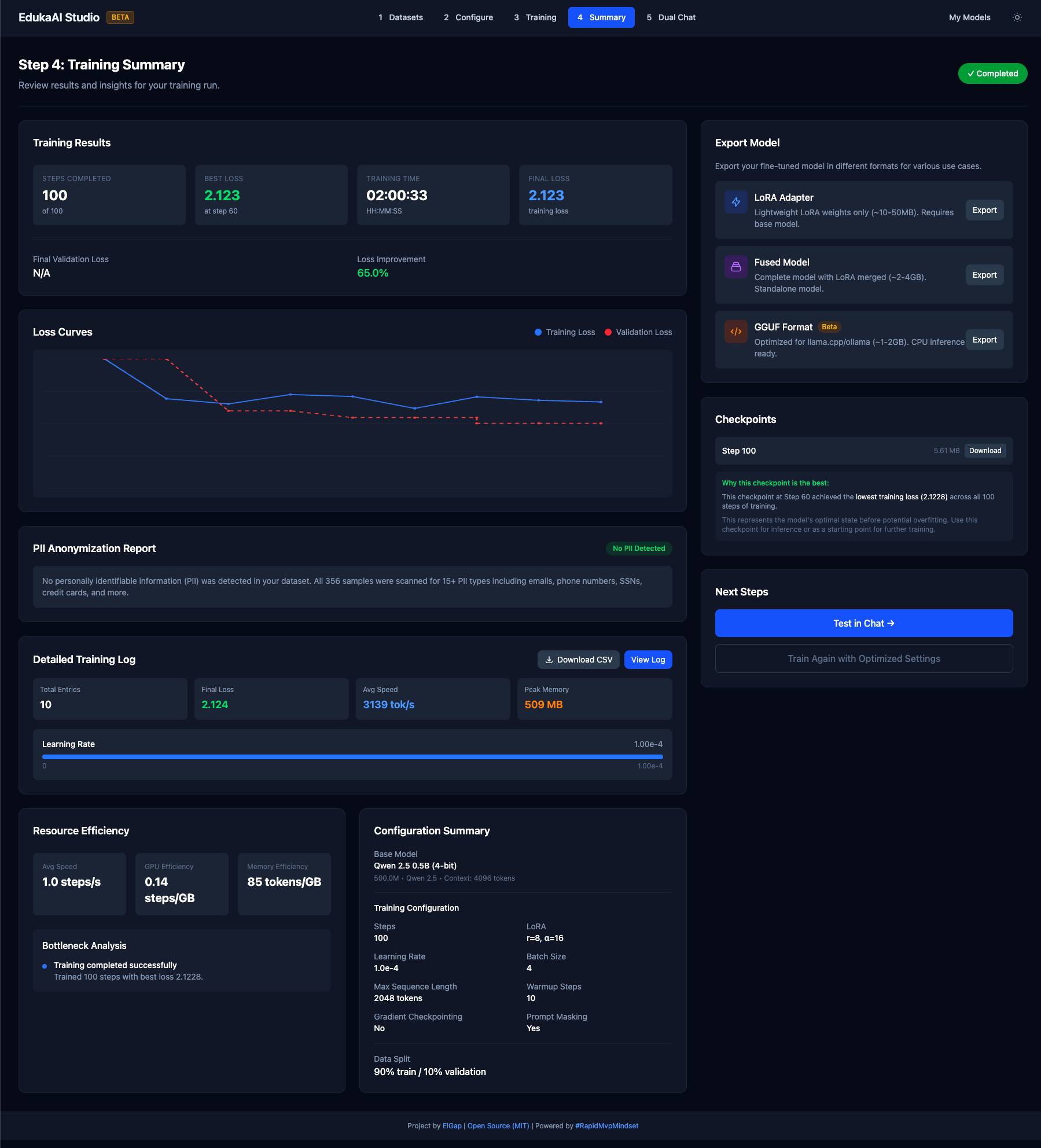
See your training summary — final loss, dataset info, and export options. Loss under 2.0 is good; under 1.0 is excellent. Click Dual Chat to test, or export your model.
Test & compare with Dual Chat
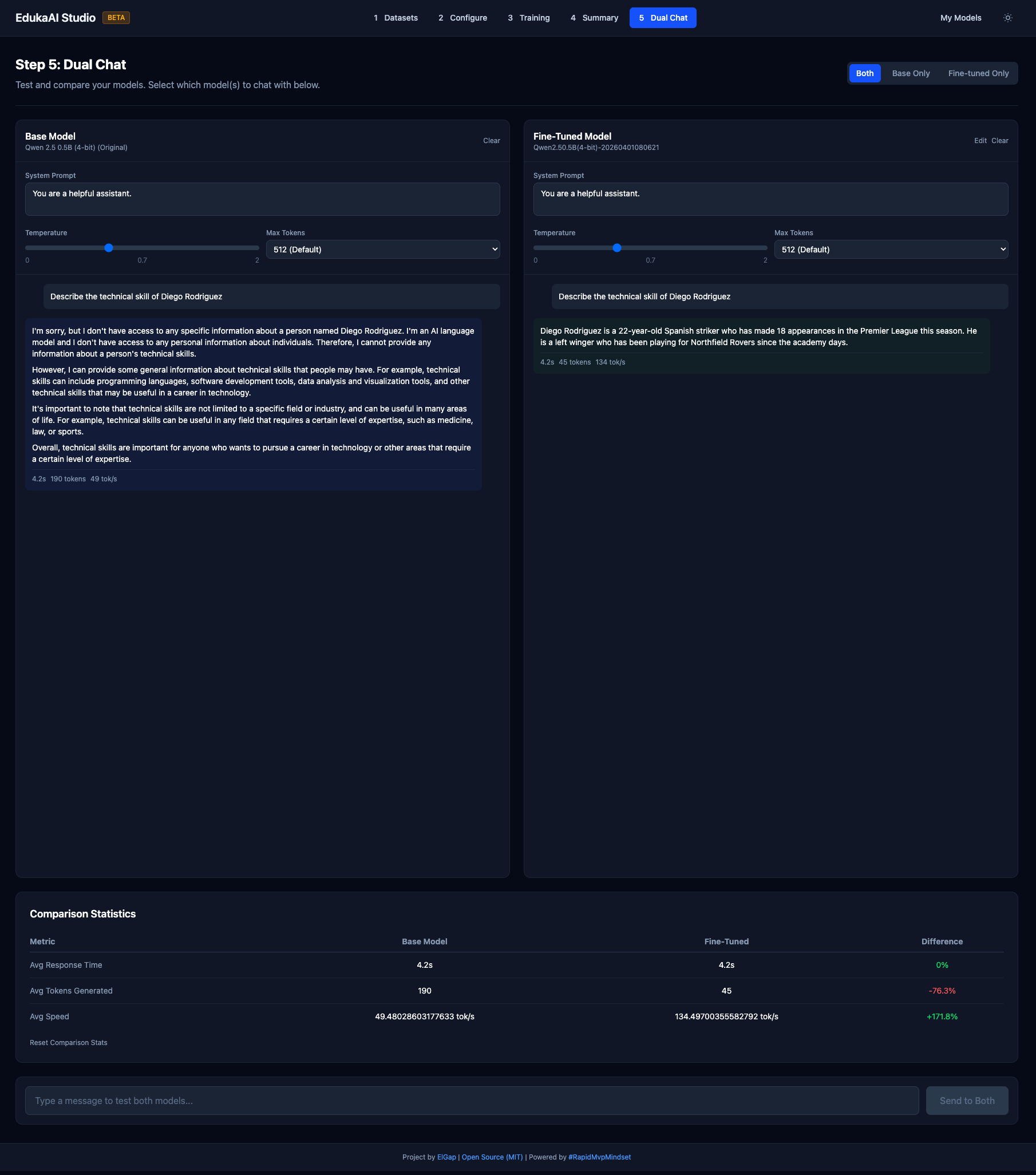
Compare your fine-tuned model against the original base model side by side. Type the same prompt into both and see the difference your data made. Adjust temperature, system prompts, and max tokens to fine-tune behavior.
What you need
Not much. That's the point.
Hardware
- Any Mac with Apple Silicon (M1/M2/M3/M4)
- 8GB RAM minimum (16GB recommended)
- ~2GB free disk space
Software
- macOS 13+ (Ventura or later)
- Python 3.10+ (auto-installed by Studio)
- Homebrew (optional, for AI Curator)
Why local matters
Fine-tuning in the cloud means uploading your data to someone else's server. Running locally means your data stays on your machine. Deploy AI Curator to your own server if you want team access — but it's always your infrastructure, your data.
Zero data transfer
Your training data and your model never leave your Mac. No uploads, no cloud training, no vendor having your data.
Compliance friendly
No DPA negotiations. No vendor security questionnaires. Data stays on your machine — compliance teams love this.
Fast iteration
No queue times, no per-hour GPU costs, no waiting. Train, test, iterate. A full training run on the Starter Pack takes 5-10 minutes on an M2 MacBook.
Zero cost
Both tools are open source (MIT license). No subscriptions, no per-run pricing, no hidden fees. Your Mac is your GPU.
About EdukaAI Studio
EdukaAI Studio is a no-code fine-tuning app for Apple Silicon. Built on Apple's MLX framework, it provides a step-by-step wizard that takes you from curated data to a custom model. No Python, no CUDA, no terminal required (unless you want to).
| Feature | Details |
|---|---|
| Framework | Apple MLX (Metal acceleration on M-series GPUs) |
| Interface | Web-based 5-step wizard — no code required |
| Testing | Dual Chat — compare original vs fine-tuned model side by side |
| Data input | JSONL, Alpaca, ShareGPT — or download the Starter Pack directly |
| Models | Any HuggingFace model compatible with MLX-LM |
| Export | LoRA adapter (small) or fused model (standalone) |
| Hardware | Any Apple Silicon Mac (M1/M2/M3/M4) — no NVIDIA GPU needed |
| License | MIT (open source) |
Common questions
Do I need a GPU?
No. EdukaAI Studio runs on Apple's MLX framework, which uses the Metal GPU built into every M-series chip. Any Mac with M1 or later works.
How long does a training run take?
With the Starter Pack (75 samples), 5-10 minutes on an M2 MacBook Pro using the Quick preset. Larger datasets take longer — but you're iterating locally with no queue times.
Do I need AI Curator?
No. You can download the Starter Pack from ai-curator.cloud and import it directly into EdukaAI Studio. AI Curator is for when you want to curate your own data — review, rate, approve/reject, filter — before training.
What models can I fine-tune?
Any model on HuggingFace that's compatible with MLX-LM. Popular choices include Qwen 2.5 (0.5B, 1.5B), Llama 3.2 (1B, 3B), Mistral, and Phi variants.
What format should my data be in?
Alpaca format (JSONL with instruction/input/output fields) is recommended. ShareGPT and plain text completion are also supported. The Starter Pack uses Alpaca format, so it works out of the box.
Is my data safe?
Yes. Both AI Curator and EdukaAI Studio run locally. No data is uploaded anywhere. AI Curator stores data at ~/.curator/. Studio stores models and data locally. Your data, your machine.
From zero to custom model
Download the Starter Pack. Install Studio. Click Train. All on your Mac, all local, all free.